One-Click CMS Publishing: Push Optimized Content Live Without the Manual Work
A practical guide to one-click CMS publishing — why manual formatting breaks down at scale, and how SEOSorted automates it while keeping human review intact.
Getting a finished, SEO-optimized article from SEO Sorted into WordPress, Webflow, NextJS, Strapi, or any CMS of your choice shouldn't take 45 minutes of copy-pasting, reformatting, and metadata entry. However, for most teams, it still does. This guide covers what one-click CMS publishing actually means, why the manual version breaks down as content volume grows, and how SEOSorted's publishing integration solves it.
Quick answer: one-click CMS publishing is a direct API/webhook connection that pushes a fully formatted, metadata-complete draft live in one action no manual reformatting, image re-uploading, or field-by-field entry required.
Worth distinguishing: this isn't the same as one-click deployment, which means installing CMS software on a server a different problem for IT admins, not content teams.
What One-Click Publishing Actually Is
Instead of exporting a draft and manually rebuilding it inside Gutenberg or a Webflow Collection, a structured payload title, body HTML, slug, featured image, categories, tags, SEO metadata gets sent to the CMS's native publishing endpoint in one request. The person publishing sees a single button, not a dozen manual steps.
Where the Manual Process Actually Breaks Down
Generative AI has dramatically compressed research and drafting time. Publishing hasn't kept pace; the bottleneck simply moved downstream, from writing to shipping.
Here's what a typical manual cycle looks like once a draft is approved: paste it into the CMS, then fix the heading hierarchy that just broke. Download every image, compress it, re-upload it. Enter the slug, meta title, description, and canonical URL one field at a time. Assign categories and tags by hand. Double-check internal links. Only then does it go live.
None of these steps is hard on its own. The cost is that they happen every single time, for every single article, and none of them require a strategic decision; they're pure mechanical overhead standing between a finished draft and a published page. Four specific failure points recur:
- Structural degradation — pasting rich text into Gutenberg or Webflow's editor often corrupts HTML: misaligned headings, lost code formatting, broken tables.
- Asset handling — every image needs downloading, converting, compressing, and re-uploading with alt text.
- Metadata entry — manual field-by-field entry is where typos and missing tags creep in.
- Taxonomy — categories, tags, and internal links require navigating separate CMS menus one by one.
Teams that have moved off fully manual publishing commonly describe this admin work as taking somewhere in the range of 45-90 minutes per article an illustrative estimate that varies by team and CMS, not a fixed benchmark. At more than a handful of articles a week, that time compounds into a real operational cost: hours spent on formatting instead of strategy, editing, or promotion.
The Right Way to Structure a Publishing Workflow
- Draft and optimize — research, write, and run on-page SEO checks before anything touches the CMS.
- Stage automatically— let a connected system handle HTML formatting, image compression, alt text, and metadata generation.
- Review before it's live — a human checks facts, brand voice, and overall quality. This step should never be skipped, especially for YMYL topics.
- Publish with one action — a single approval pushes the fully formatted draft to WordPress, Webflow, or another connected destination.
- Confirm the last mile — sitemap updates and indexing pings (like IndexNow, where supported) happen automatically once the post is live.
The principle is simple: automate everything except the one step that should stay human final approval.
How SEOSorted's One-Click Publishing Works
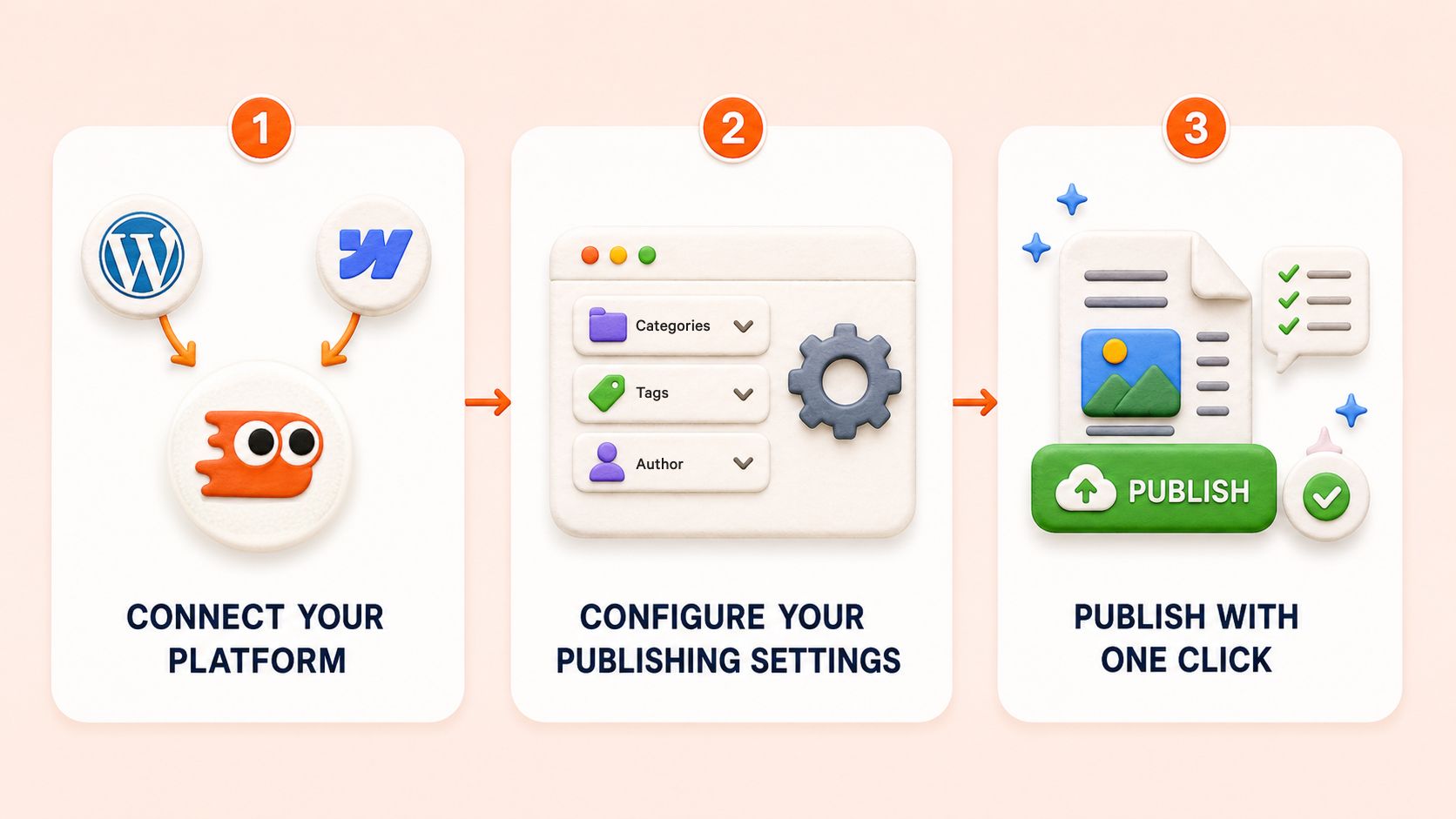 What it does: connects directly to your CMS — WordPress, Webflow, or a custom destination via webhook and pushes a fully formatted, SEO-ready draft live with a single click. No manual copy-pasting, no rebuilding headings, no re-uploading images one at a time.
How it works:
Connect your platform— link your WordPress site or Webflow workspace, or set up a custom webhook for another CMS.
Configure your publishing settings — set default categories, tags, author, and whether posts publish immediately or land as drafts for review.
Publish with one click — select an article, or an entire content cluster, and publish. SEOSorted handles HTML formatting, image uploads, and metadata in the background.
Key capabilities:
- Direct WordPress and Webflow integration, with content published in proper Collection or post format
- Bulk publishing of an entire topic cluster at once, not one article at a time
- Automatic featured image and inline image upload
- SEO metadata (title, description, slug, canonical) set automatically
- Category and tag assignment mapped to your existing taxonomy
- Custom webhook support for CMSs and destinations outside WordPress/Webflow
Who it's for:
- SEO agencies publishing across multiple client sites without juggling separate CMS logins
- SaaS content teams who need optimized drafts live in Webflow without breaking Collection formatting
- In-house teams hitting a weekly publishing cadence without adding headcount
- Solo consultants who want a staging-and-approve workflow without building custom tooling
Example Workflow
A SaaS content team publishes three articles a week across a Webflow blog and a WordPress resource center previously about two hours of manual formatting and metadata entry per article across both platforms. With SEOSorted connected, the team drafts and optimizes as usual, stages it for review, and an editor checks facts, tone, and structure before clicking publish once. SEOSorted formats the HTML, handles images, sets metadata, and assigns categories on each platform automatically. The manual step drops to the time it takes to review and click a button actual time saved varies by team and volume, but the mechanical rebuilding work is gone.
Publishing Best Practices
- Automate the mechanical work, not the judgment calls. Formatting, image processing, and metadata entry are safe to automate. Facts, statistics, and brand voice always need a human check.
- Keep taxonomy consistent. Map categories and tags to your existing site structure rather than letting automation improvise new ones.
- Validate schema before it goes live. If your publishing tool generates JSON-LD, confirm it matches the visible page content exactly.
Common questions
It connects directly to your CMS (WordPress, Webflow, or a custom webhook) and publishes a fully formatted, SEO-ready draft with a single click, handling formatting, image uploads, and metadata automatically.
Yes, configure articles to publish as drafts for review, or go live immediately, depending on your workflow.
Yes, via custom webhook support, connecting to other CMSs or automation platforms like Zapier, Make, or n8n.
Yes, featured and inline images are uploaded automatically as part of the publishing process.
The platform flags the failed publish so you can review and retry rather than silently losing the content check your specific plan's documentation for exact failure-handling behavior.
No, and it shouldn't. Automation handles formatting and metadata; a human reviewer should always check facts, tone, and quality before final publish.
Other Features

How to Rank on ChatGPT: A Practical Guide to ChatGPT Search Visibility
A practical guide to ChatGPT Search visibility: what's confirmed, what's inference, and an 8-step framework to earn citations, not chase a fake #1 rank.

How to Rank on Claude: A Practical Guide to Claude Search Visibility
A practical guide to Claude's web-retrieval behavior: what's documented, what's inference, and an 8-step framework to earn citations, not chase a fake rank.

How to Appear on Gemini: A Practical Guide to AI Search Visibility
A practical guide to Gemini's web-retrieval behavior, distinct from Google AI Overviews, with a framework to track citation visibility over time.

Start building your content library in under 8 minutes.
Your competitors are publishing every week. Every week you don't is a week of organic traffic going to them.
No Credit Card Required.