

Ahrefs vs. KWFinder in 2026: The Real Cost-Per-Published-Article Verdict
Imagine spending $249 every month on Ahrefs Standard, only to burn through your credits running basic competitor filters before you've written a single sentence. Switch to KWFinder instead, and you cut that software bill by 80%, but now you're manually researching internal links, formatting drafts, and wrestling with CMS uploads yourself. The real Ahrefs vs KWFinder question isn't which tool costs less on the invoice; it's which one costs less per published article.
Both tools have real limits that don't show up on the pricing page. Ahrefs' $29 Starter plan burns through its 100-credit cap in about two afternoons of normal filtering. KWFinder's daily lookup cap can stop a content planning session cold, mid-session, with no way to push through except waiting until tomorrow.
This breaks down what each tool actually costs once you account for credit caps and stack bloat, how their keyword difficulty scores diverge in ways that can mislead your content calendar, and where the real bottleneck sits once you've got your keyword list in hand because it's rarely the tool itself.
Ahrefs vs KWFinder: Architectural Philosophies
Ahrefs: Enterprise Competitive Intelligence and Backlink Auditing. Ahrefs is built around deep competitive intelligence, full backlink indexes, Content Gap reports, and Traffic Potential metrics that assume you're running active link outreach and technical audits alongside keyword research. That depth is real, but it also means a lean team pays for capability it may never fully use. Ahrefs has also raised prices before its 2024 tier restructuring pushed entry costs higher, and most existing comparison content still quotes older numbers that no longer match what you'd actually be billed today.
KWFinder: Rapid Long-Tail Discovery for Budget Operators. KWFinder strips this down to seed-term and competitor-URL lookups, color-coded difficulty scores, and search trend graphs, fast for finding long-tail keywords, but it stops there. No technical auditing, no deep backlink evaluation, nothing beyond the keyword list itself.
Ahrefs vs KWFinder Pricing: 2026 Cost Realities
Ahrefs Pricing: Credit Caps, Seat Fees, and Tier Restrictions. Ahrefs starts at $129/month for Lite, with Standard running at $249/month, and that's before seats. Adding team members costs $40 to $80 per user per month, and the $29 Starter plan that looks like an accessible entry point burns through its 100-credit cap in about two afternoons of normal filtering. Run the annual math on Standard, and $249/month becomes roughly $3,000 a year in real money for a team that might only log in twice a month to pull five blog topics.
KWFinder Pricing: Daily Lookup Limits and Multi-Tool Dependencies. Most guides call KWFinder the obvious budget pick and leave it there. That's incomplete; it runs $29.90/month on an annual plan, or $49/month billed monthly, with a 100-lookup daily cap on the Basic tier, but it has no technical crawling, backlink auditing, or content editing. Teams typically add Screaming Frog ($21/mo) and SurferSEO ($89/mo) to cover those gaps, pushing total spend past $150/month and quietly erasing the savings KWFinder was supposed to deliver in the first place.
Keyword Difficulty Mechanics: Referring Domains vs. Blended Metrics
Most guides treat keyword difficulty as a single trustworthy number. That's wrong, and the two tools calculate it in genuinely different ways. Ahrefs' Keyword Difficulty is based strictly on the referring domains pointing at top-ranking pages, so it can rate a term as difficulty 12 because those pages have few backlinks, while all ten SERP spots are actually held by DR 85+ enterprise domains ranking on sitewide authority a young site simply can't displace.
KWFinder blends Moz Domain Authority and Page Authority instead, which captures a broader site-level signal but obscures the specific link-building requirement for any individual page. Trusting either number in isolation, without checking who's actually occupying the SERP, is how teams end up targeting keywords they were never realistically going to rank for, and it's a mistake both a $29 tool and a $249 tool will happily let you make.
Workflow Breakdown: Research to Publishing
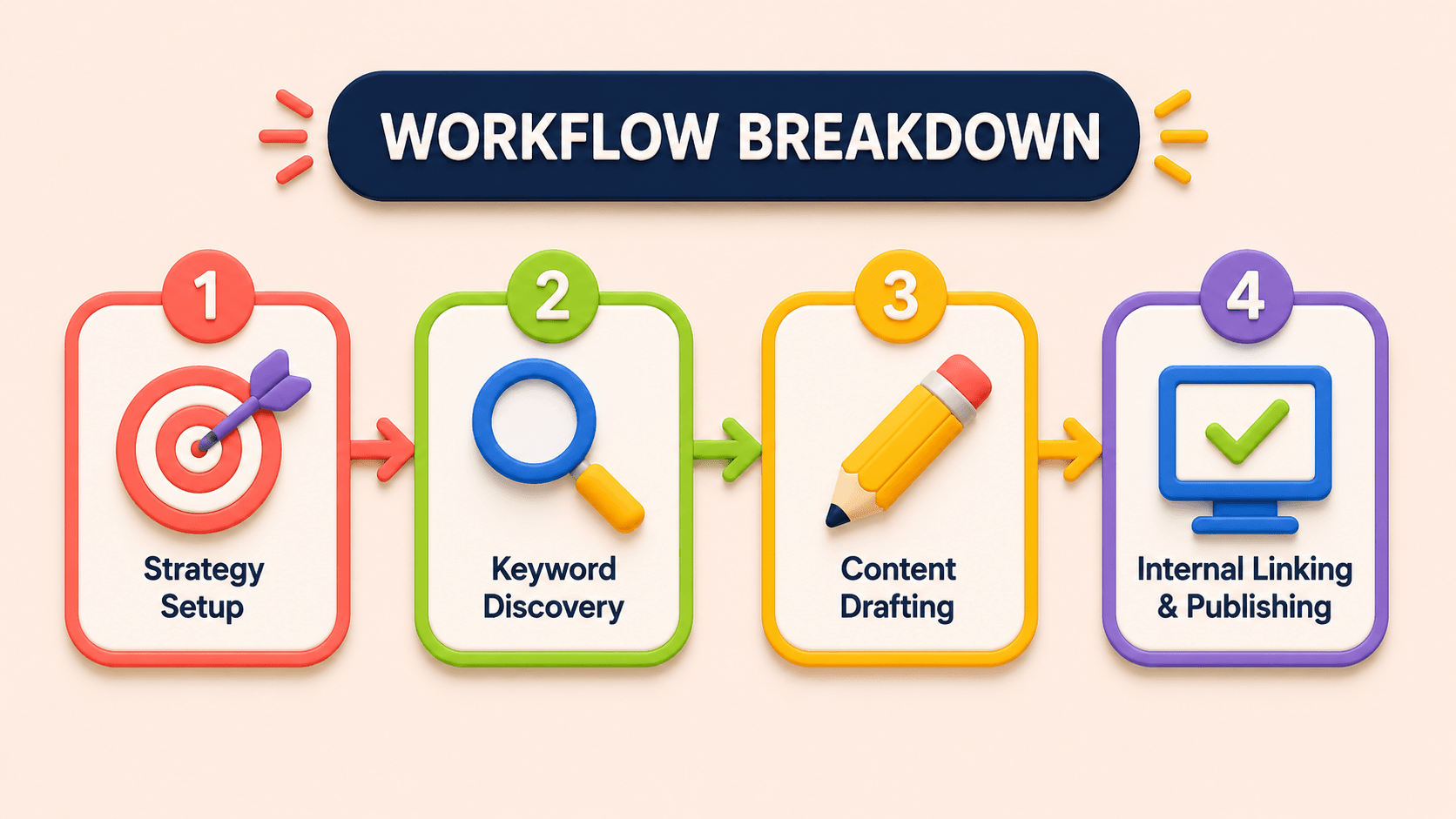
Exporting a keyword list into a spreadsheet and calling the research phase done is an outdated way to run content production; identifying low-competition keywords in either tool represents only about 10% of the actual workload. Here's the rest of the chain:
- Strategy setup. Map business goals and buyer personas, and audit existing site architecture for cannibalization before running a single query.
- Keyword discovery. In Ahrefs, that means querying Keywords Explorer, checking Traffic Potential, and cross-referencing Content Gap reports, burning credits with every filter applied. In KWFinder, it's seed-term and competitor-URL lookups against a 100-per-day cap.
- Content drafting. Neither tool touches this stage. Someone has to manually build the brief, run a live SERP check for subtopics, write the draft, and work the target keywords in by hand the exact labor that both tools' pricing pages conveniently leave out of the conversation.
- Internal linking and publishing. Writers scan old posts by hand for anchor opportunities, then copy the draft into WordPress or Webflow, format headings, add metadata, and hit publish.
That four-stage manual chain is identical regardless of which tool supplies the keyword list; the software was never the bottleneck; stages 3 and 4 are.
Here's how that plays out at different scales:
Early-stage founder on a $500 budget: choosing KWFinder over Ahrefs Lite saves money upfront, but finding 15 achievable long-tail keywords still means roughly 10 hours a week writing, researching internal links, and uploading manually, and hitting the 100 daily lookup cap mid-planning session stalls that work further. The software savings get eaten by the founder's own opportunity cost.
Three-person team scaling to 50k visits/month: Ahrefs Standard plus seats plus the $99/month Content Kit add-on pushes software spend past $400/month, but the team still can't publish more than two articles a week. The data is enterprise-grade; the publishing velocity isn't, and that's the metric that actually determines whether the traffic goal gets hit.
Agency running 12 client retainers: Ahrefs Advanced runs $5,388 a year, while KWFinder Agency's shared 1,200 daily lookups across 10 seats cause system locks during client reporting periods. Neither plan touches drafting, linking, or publishing, so account margins absorb that labor either way, quietly capping how many retainers a small team can actually service well.
SEOSorted: Unifying Research, Generation, and CMS Delivery
Most existing "Ahrefs vs KWFinder" content comes from affiliate sites, and it stops at feature tables and generic advice: Ahrefs for agencies, KWFinder for budget bloggers, without touching credit consumption mechanics, per-seat fees, or what any of this costs once you add up the labor to actually publish something. None of it calculates cost per published article, which is the only number that actually tells you whether a tool is paying for itself.
Neither Ahrefs nor KWFinder does anything past step 2 in the workflow above. SEOSorted picks up exactly where both stop: it evaluates real-time live SERP intent instead of a single static difficulty score, so you're checking who's actually ranking before you commit content budget to a keyword, not trusting a number that might be hiding DR 85+ incumbents behind a misleadingly low difficulty score.
It also collapses stages 3 and 4 into one motion. Keyword research feeds directly into automated drafting, contextual internal links get inserted without anyone scanning old posts by hand, and finished drafts publish straight to your CMS, with no credit caps, no per-seat markup, and no separate crawler or content editor subscription stacked on top of an already-expensive keyword tool.
Common questions
Ahrefs is an enterprise SEO suite with comprehensive backlink analysis, site auditing, and keyword research starting at $129/month. KWFinder is a specialized keyword lookup tool inside the Mangools suite starting at $29.90/month, built for finding long-tail terms through a simple interface. Ahrefs suits full-service agencies running active outreach; KWFinder suits budget-conscious bloggers and solo operators.
KWFinder is significantly more affordable, starting at $29.90/month on annual billing versus Ahrefs' entry Lite plan at $129/month. Ahrefs does offer a $29 Starter plan, but its 100-credit monthly cap restricts active use, which makes KWFinder the better value if you're specifically looking for basic keyword lookups.
Yes, both provide traffic estimates, but at different depths. Ahrefs delivers granular traffic metrics, historical position tracking, and page-level data across millions of domains. KWFinder offers more basic traffic insight through its companion Mangools tools, SERPWatcher and SiteProfiler, which is enough for a fundamental check but not a deep competitive audit.
Ahrefs calculates Keyword Difficulty strictly from the referring domains linking to top-ranking pages. KWFinder blends Moz Domain Authority, Page Authority, and backlink data into one score, giving a broader quality signal for creators targeting low-competition terms, though neither number tells you who's actually occupying the SERP.
Not really, it functions more like a paid trial than a working research tool. Its 100-to-200 monthly report credit cap gets consumed fast, since applying filters or opening reports both deduct credits, and active researchers typically exhaust the allocation within a couple of sessions, well before a real content sprint is finished.
Related Reading

Content Cluster Strategy: A 4-Step Framework for Stalled Pillar Pages
Most stalled pillar pages are cluster design problems, not writing problems. This guide gives a four-step framework for intent mapping, pillar and spoke structure, and bidirectional linking, plus how to automate cluster upkeep.

Automated Keyword Research: How AI Replaces the Spreadsheet
Spreadsheets turn keyword research into cleanup work and cannibalization risk. This guide shows how AI clusters keywords by live SERP overlap, and gives a four-step framework for going from seed term to published draft.

What Does SEO Position Mean? A Practical Guide for Growth Teams
SEO position is the spot a page holds on a search results page, not the job title. This guide shows why average position misleads and how to track and improve rankings by intent, device, and location.
